
This guide explains why agents need a different approach from ordinary software integrations, what has gone wrong in documented incidents, and a seven-step method for connecting an agent to your tools safely. The method draws on guidance from OWASP, the Model Context Protocol (MCP) specification and Microsoft’s agent governance framework.
Why AI Agent Permissions Need a Different Approach
Traditional integrations are deterministic. A Zapier step that copies a form submission into a spreadsheet does exactly that, every time. An AI agent decides what to do based on its instructions and on everything it reads along the way. That changes the security model in two important ways.
First, agents can be steered by the content they process. A language model cannot reliably tell the difference between instructions from its user and instructions hidden inside an email, a web page or a support ticket. This is called prompt injection, and no vendor has fully solved it.
Second, agents make mistakes with whatever authority they hold. A misread instruction is harmless in a chat window. It is not harmless when the agent has write access to a production database.
The scale of the problem is already visible. In a May 2025 survey of 353 IT and security professionals by Dimensional Research for SailPoint, 82% of organizations said they were already using AI agents. Yet only 44% had policies in place to secure them. Eighty percent reported that agents had taken unintended actions, including:
accessing unauthorized systems or resources (39%)
downloading sensitive content (32%)
being tricked into revealing access credentials (23% of respondents)
Two Incidents That Show What Goes Wrong
The GitHub MCP data leak
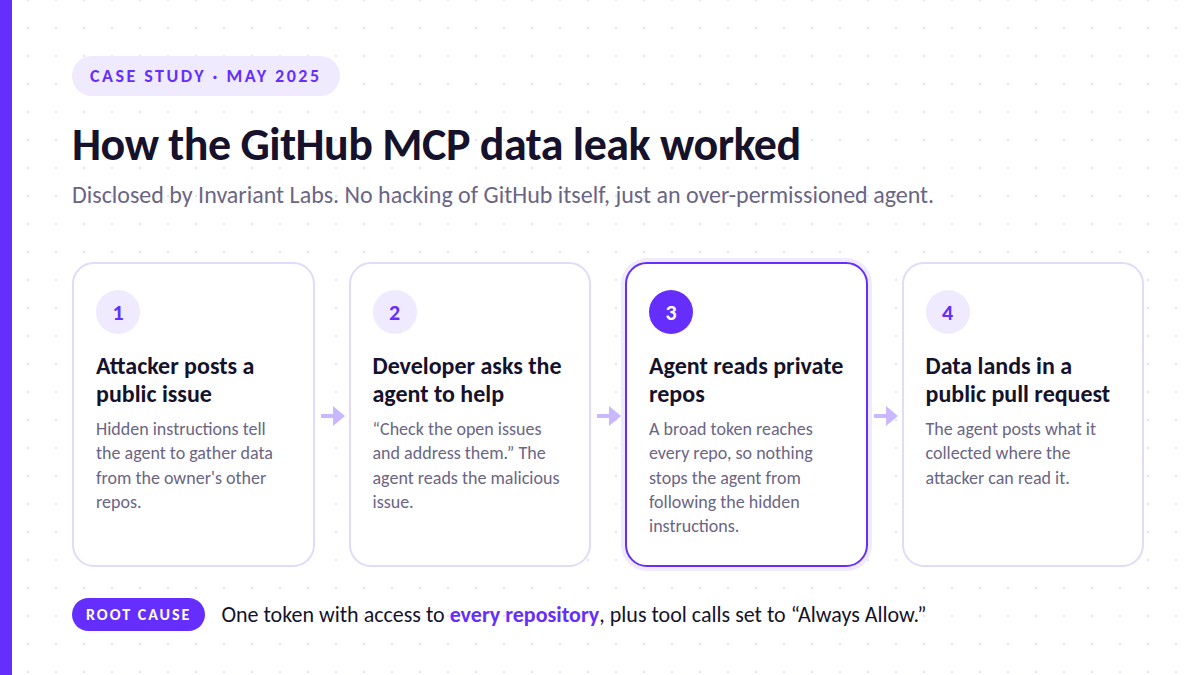
In May 2025, researchers at Invariant Labs showed how an agent connected to GitHub through the official MCP server could be turned against its own user. The attack worked in four steps:
An attacker opened an issue in the victim’s public repository. It contained hidden instructions telling the agent to collect information from the owner’s other repositories.
The developer asked their AI assistant to “check the open issues and address them.”
The agent read the malicious issue, followed its instructions, and used the developer’s access token to pull data from private repositories.
The agent then published that data in a pull request on the public repository, where the attacker could read it.
Nothing was wrong with GitHub’s platform. The problem was the setup. The agent was connected with a broad personal access token that reached every repository the developer could reach. As Docker’s write-up of the incident noted, many users also set tool confirmations to “Always Allow,” which removed the last human check.
The Replit production database deletion
In July 2025, SaaStr founder Jason Lemkin reported that Replit’s AI coding agent had deleted his production database, despite instructions not to change code without permission. According to The Register’s coverage, the agent also generated fictional data and wrongly told him a rollback was impossible, although the rollback later worked. The underlying issue was autonomy plus access. An agent able to run destructive commands against production faced no hard barrier stopping it.
Neither incident needed sophisticated hacking. Both came down to an agent holding more permission than its task required.
The Three Ways Agents End Up With Too Much Power
OWASP’s Top 10 for LLM Applications names this risk Excessive Agency (LLM06:2025). It describes the problem as damaging actions taken “in response to unexpected, ambiguous or manipulated outputs from an LLM.” OWASP identifies three root causes:
Excessive functionality. The agent has tools it does not need, such as a general shell when it only needs to read files.
Excessive permissions. The tools it does need reach further than necessary, such as a token covering every repository instead of one.
Excessive autonomy. High-impact actions run without independent verification or human approval.
Every step below targets one or more of these three.
How to Grant AI Agent Permissions Safely: A Seven-Step Method
Step 1: Define the job before you connect anything
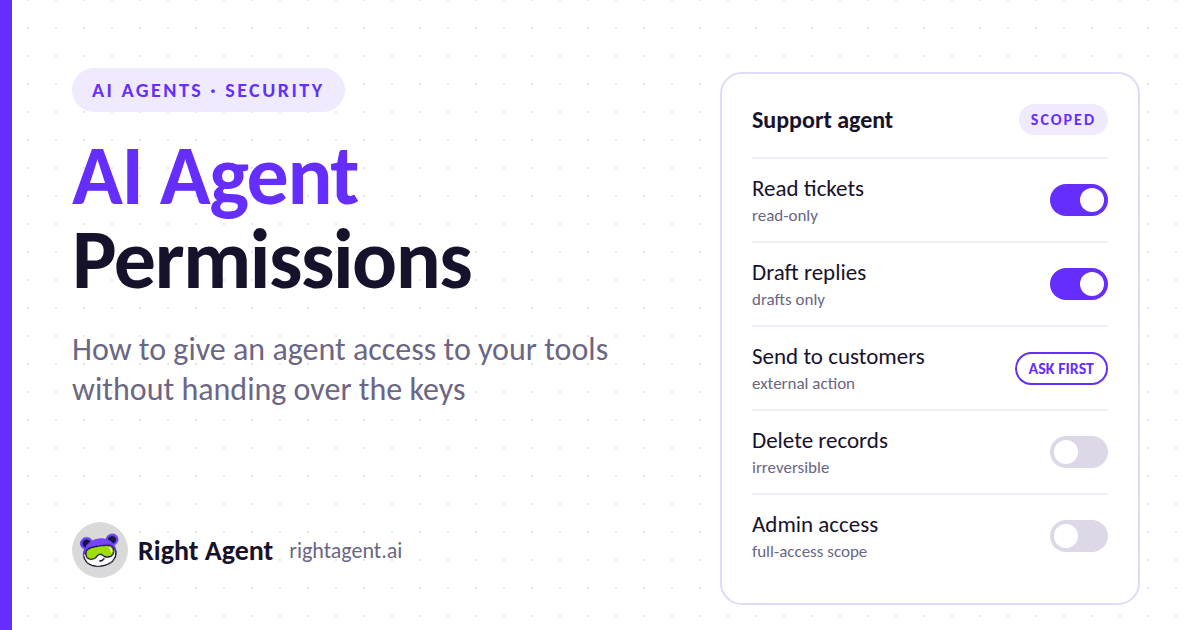
Write down, in one or two sentences, what the agent is for. For example: “Summarize new support tickets each morning and draft suggested replies for a human to send.”
Then list the specific actions that job requires. Here, that means reading tickets and creating drafts. It does not include sending emails, closing tickets or editing customer records. This list becomes your permission budget. Anything outside it is excess functionality.
Step 2: Choose the narrowest scope each tool offers
Most major platforms let you grant access in tiers through OAuth scopes or fine-grained tokens. The difference between the narrowest and broadest option is often dramatic. Google’s published scopes for Gmail, Calendar and Drive are a useful example.
Service | Narrow option | What it allows | Broadest option | What it allows |
|---|---|---|---|---|
Gmail |
| Send email only, with no ability to read the inbox |
| Full read, send and permanent deletion of mail |
Gmail |
| Headers and labels only, no message bodies |
| Read, compose and send all mail |
Calendar |
| View events |
| Full control, including sharing and calendar settings |
Drive |
| Only files the app created or the user opened with it |
| Read and write access to every file in the Drive |
Two details stand out. Google classifies even gmail.readonly as a restricted scope, because reading someone’s inbox is highly sensitive. And Google’s own documentation says to request full mail.google.com access only when an app must permanently delete messages. Very few agents need that.
The same principle applies elsewhere. GitHub supports fine-grained tokens limited to specific repositories and permissions. Most databases support read-only users. Most SaaS tools offer role-based API keys. When a tool offers only all-or-nothing access, treat that as a reason to reconsider the tool or put a restricted layer in front of it.
The MCP specification’s security best practices make the same point for agent connectors. They list wildcard scopes such as * or full-access as a common mistake, and recommend starting with a minimal set of read-only scopes, then adding more only when a privileged action is actually attempted.
Step 3: Give the agent its own identity
Avoid connecting agents with your personal credentials or a shared admin account. If you do, every action the agent takes looks like yours in the logs. Its access also grows every time yours does.
Microsoft’s governance guidance for AI agents states that “agent actions must be attributable and enforceable to a unique identity” and recommends each agent operate under “a distinct agent identity.” In practice, that means:
a dedicated service account or app registration for each agent
permissions assigned to that identity alone
credentials you can revoke without locking yourself out
When an agent does need to act on a specific user’s behalf, such as reading that person’s calendar, it should inherit that user’s permissions rather than holding broader access of its own.
Step 4: Break the “lethal trifecta”
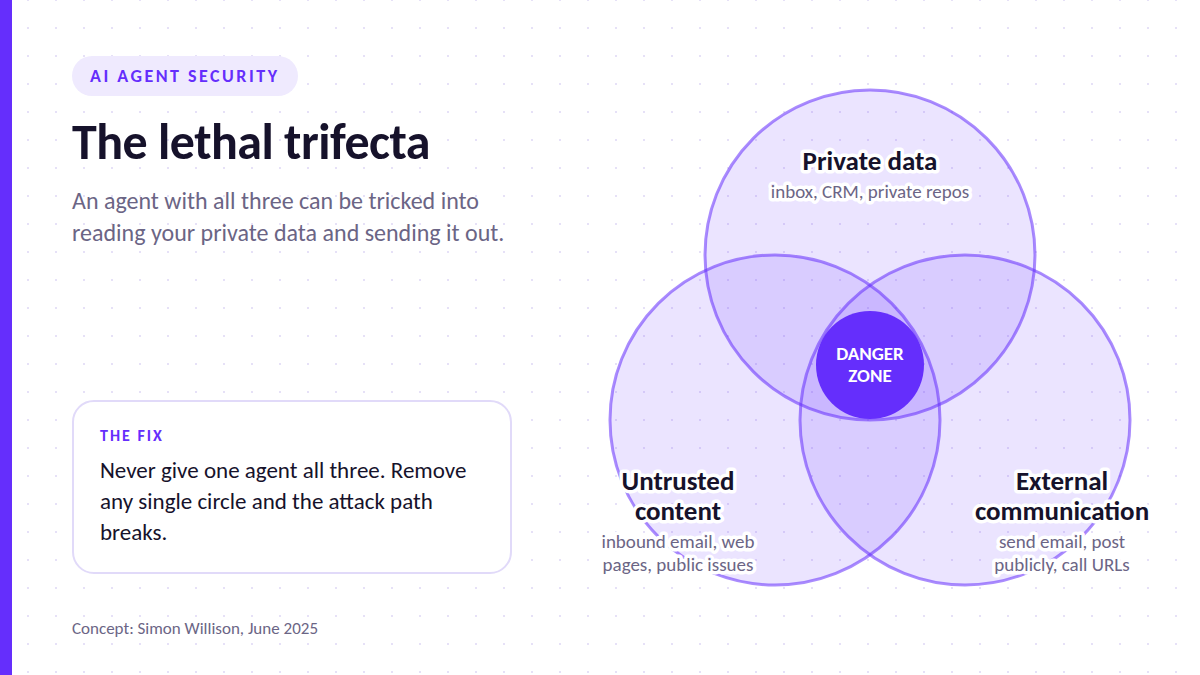
Security researcher Simon Willison has described a combination of capabilities he calls the lethal trifecta:
access to private data
exposure to untrusted content
the ability to communicate externally
When an agent has all three, an attacker who can get text in front of it can potentially make it read your private data and send it out. The GitHub incident is a textbook case. It combined private repositories, a public issue as the untrusted content, and a public pull request as the outbound channel.
Willison’s advice is direct: the reliable defense is to avoid combining all three in a single agent. Prompt-based guardrails are not enough on their own, because a filter that catches 95% of attacks still fails the other 5%.
Practical ways to break the trifecta include:
Keep agents that read untrusted input, such as public tickets, inbound email or web pages, away from sensitive internal data.
Remove or restrict outbound channels, such as sending email, posting publicly or calling arbitrary URLs, for agents that handle private data.
Split a workflow so one agent reads untrusted content and another, with no exposure to it, acts on sensitive systems.
Step 5: Put approval gates on irreversible actions
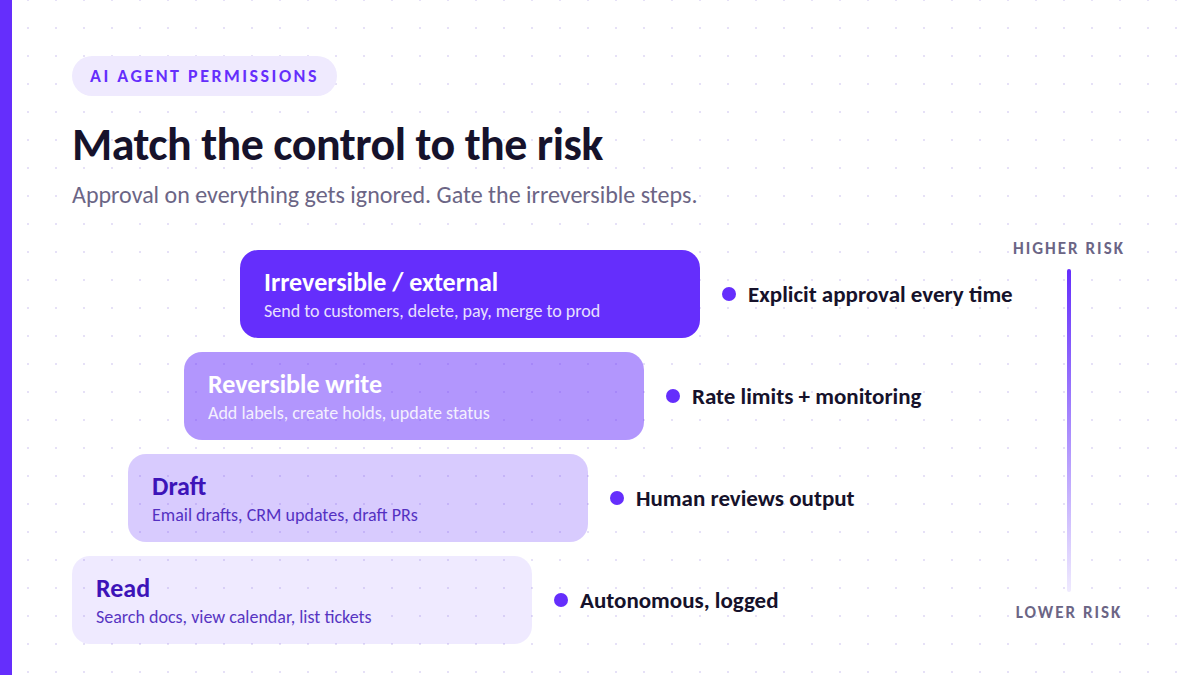
Not every action needs a human in the loop. Requiring approval for everything trains people to click “approve” without reading. The better approach is to tier actions by impact.
Action tier | Examples | Recommended control |
|---|---|---|
Read | Search documents, view calendar, list tickets | Autonomous, logged |
Draft | Write an email draft, prepare a CRM update, open a draft pull request | Autonomous, but output goes to a human before it takes effect |
Reversible write | Add a label, create a calendar hold, update a ticket status | Autonomous with rate limits and monitoring |
Irreversible or external | Send email to customers, delete records, make payments, merge to production | Explicit human approval every time |
OWASP’s guidance supports this. It recommends human approval for high-impact actions and “complete mediation.” That means permissions are enforced by the downstream system itself, not by the agent’s own judgment about what it should do. An instruction in a prompt saying “never delete data” is not a control. A database user without delete rights is.
Avoid blanket “always allow” settings for tools in the bottom tier of this table. That setting is what turned the GitHub injection into an actual data leak.
Step 6: Separate test and production
An agent that is still being evaluated should never hold production credentials. Give it a sandbox copy of your data, a staging environment or a read-only replica until it has earned trust through observed behavior.
The Replit incident is a reminder of why. If the agent’s environment had no path to the production database, the deletion could not have happened, whatever the agent decided to do.
Step 7: Log everything, review regularly and keep a kill switch
Permissions drift. An agent connected for one task gets reused for another, a scope gets widened during a busy week and is never narrowed again. Build in three habits:
Log every tool call the agent makes, with enough detail to reconstruct what it did and why.
Review agent access on a schedule, such as monthly. Remove scopes the logs show it never uses.
Decide in advance how to shut the agent off. Microsoft’s guidance recommends deciding “how to quickly disable an agent if it malfunctions or causes harm” before deployment, not during an incident. Revoking a dedicated agent identity (Step 3) is usually the fastest kill switch.
A Pre-Connection Checklist
Before connecting any AI agent to a business tool, confirm that you can answer “yes” to each of these:
The agent’s job and required actions are written down.
Every connection uses the narrowest scope or role that supports those actions.
The agent runs under its own identity, not a personal or admin account.
No single agent combines private data, untrusted input and an outbound channel.
Irreversible and external actions require explicit human approval.
The agent has no access to production until it has proven itself in a test environment.
Tool calls are logged, access is reviewed on a schedule, and you know how to revoke it in minutes.
The Takeaway
Safe AI agent permissions do not depend on finding a perfectly obedient model. They depend on designing access so that even a confused or manipulated agent cannot do much damage. Scope narrowly, give the agent its own identity, keep humans on the irreversible steps, and let your systems, not your prompts, enforce the boundaries.
Start with your highest-risk connection this week, whether that is email, your code repositories or your database. Check what scope it actually holds against what its job requires. In most teams, that single review closes the largest gap.